
Key facts
Start here
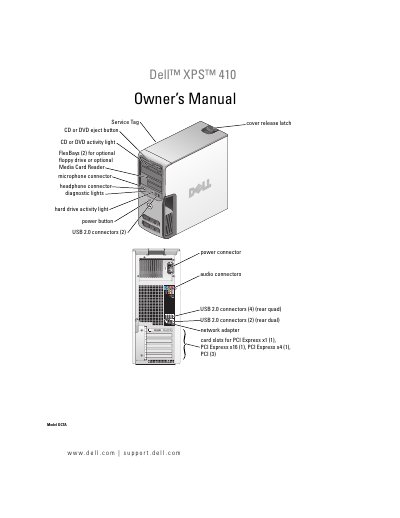
Dell XPS 410 Owner's Manual
This owner's manual is for the Dell XPS 410 computer. It covers front and back views, connectors, monitor and printer setup, Internet and network setup, media use, power management, cleaning, performance optimization, RAID, diagnostics, drivers, problem solving, and parts removal and installation.
The manual also includes an appendix with specifications, system setup options, boot sequence, password and CMOS clearing, Dell technical support policy, FCC notice, contact information, a glossary, and an index.
Dell XPS 410 specifications
| Processor type | Intel Pentium 4, Intel Pentium D, Intel Core 2 Duo |
|---|---|
| Level 2 cache | at least 2 MB |
| Memory type | dual-channel 533-, 667-, and 800-MHz DDR2 |
| Memory connectors | four |
| Memory capacities | 512 MB or 1 GB |
| Minimum memory | 512 MB |
| Maximum memory | 4 GB |
| Chipset | Intel P965 Express Chipset |
| DMA channels | eight |
| BIOS address | F0000h |
| BIOS chip (NVRAM) | 4 MB |
| Network interface | Integrated Intel 82566DC Gigabit Network Connection |
| System clock | 800- or 1066-MHz data rate |
| Video type | PCI Express |
Source: Dell XPS 410 Owner's Manual
All Dell XPS 410 documents by type
Disassembly, diagnostics and part numbers, for repair.
Day-to-day operation, settings and troubleshooting. Start here if the product is already set up.
Questions answered in these manuals
What is the minimum space required between the computer vents and nearby objects?
You must ensure there is a minimum of two inches of space between all vents and any object near the vents.
What should you do if the power light is blinking green?
Press a key on the keyboard, move the mouse, or press the power button to resume normal operation.
What is the minimum space required between the computer vents and nearby objects?
You must ensure there is a minimum of two inches of space between all vents and any object near the vents.
What should you do if the power light is blinking amber?
Check that the voltage selection switch is set to match the AC power at your location.
What is the maximum memory supported by the Dell XPS 410?
The manual lists a maximum memory of 4 GB.
What is the Service Tag used for?
It identifies your computer when you use support.dell.com or contact support.