
Key facts
Start here
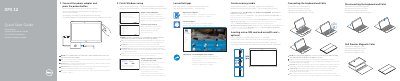
Dell XPS 12 9250 Quick Start Guide
The Dell XPS 12 9250 Quick Start Guide provides essential instructions for setting up the device, including connecting power, completing Windows setup, and registering the computer through Dell SupportAssist.
It details the hardware layout of the tablet, including port locations and camera placement, and provides instructions for connecting and disconnecting the keyboard and Dell Premier Magnetic Folio.
Dell XPS-12-9250 specifications
| MicroSD capacity | up to 128 GB |
|---|---|
| Charging time (empty battery) | 4 to 5 hours |
| USB 3.1 Gen 2 speed | up to 10 Gbit/s |
| Thunderbolt 3 speed | up to 40 Gbit/s |
Source: Dell XPS 12 9250 User Guide
All Dell XPS-12-9250 documents by type
The shortest path to a working setup, usually only a few pages.
Day-to-day operation, settings and troubleshooting. Start here if the product is already set up.
Disassembly, diagnostics and part numbers, for repair.
Questions answered in these manuals
How do I know if the keyboard is connected correctly?
The keyboard backlight will turn on for 2 seconds when the tablet and keyboard docking pins are aligned correctly.
When should I insert the SIM and microSD cards?
It is recommended to insert these cards before powering on the tablet.
How long does it take to fully charge an empty battery?
It takes approximately 4 to 5 hours to fully charge a completely discharged battery.
What is the maximum supported microSD card capacity?
The tablet supports microSD cards with a capacity of up to 128 GB.
Is it recommended to insert the SIM and microSD cards before powering on?
Yes, it is recommended to insert the micro-SIM card and the microSD card before powering on the tablet.
When does the keyboard backlight turn on?
The keyboard backlight turns on for 2 seconds when the tablet-docking pins and keyboard-docking pins are aligned correctly.