
Key facts
Start here
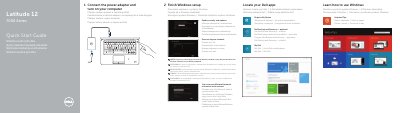
Dell Latitude 12 7000 Series (7250/E7250) Computer Quick Start Guide
This quick start guide for the Dell Latitude 12 7000 Series computer is presented in several languages. The document identifies computer model Latitude 7250/E7250, regulatory model P22S and regulatory type P22S002. It covers connecting the power adapter and turning on the computer, finishing Windows setup, locating Dell apps, registering the device, enabling security and updates, connecting to a network, and signing in with a Microsoft account or creating a local account.
The Features section uses numbered callouts for status lights, microphones, camera, security-cable slot, power button, Mini-DisplayPort, USB 3.0, headset, memory card reader, optional NFC/smart-card/fingerprint readers, touchpad, network and HDMI connectors, USB 3.0 with PowerShare, power connector, optional dock connector, service-tag label, battery release latch, battery and speakers. It also gives links for product support and manuals, contacting Dell, and regulatory and safety information.
Dell Latitude 12 7000 Series specifications
| Computer model | Latitude 7250/E7250 |
|---|---|
| Regulatory model | P22S |
| Regulatory type | P22S002 |
| USB | USB 3.0 with PowerShare |
| Fingerprint reader | Optional |
Source: Dell Latitude 12 7000 Series (7250/E7250) Computer Quick Start Guide
All Dell Latitude 12 7000 Series documents by type
The shortest path to a working setup, usually only a few pages.
- Dell Latitude 12 7000 Series (7250/E7250) Computer Quick Start Guide 2 p
- Dell Latitude 12 7000 Series Laptop Quick Start Guide 2 p
- Dell Latitude 12 7000 Series 2-in-1 Quick Start Guide 2 p
- Dell Latitude 12 7000 Series 2-in-1 Quick Start Guide 2 p
- Dell Latitude 12 7000 Series Notebook Quick Start Guide 2 p
- Dell Latitude 12 7000 Series Quick Start Guide 2 p
- Dell Latitude 12 7000 Series Notebook Quick Start Guide 2 p
- Dell Latitude 12 7000 Series Quick Start Guide 2 p
- Dell Latitude 12 7000 Series Notebook Quick Start Guide 2 p
- Dell Latitude 12 7000 Series Notebook Quick Start Guide 2 p
- Dell Latitude 12 7000 Series 2-in-1 Quick Start Guide 2 p
- Dell Latitude 12 7000 Series 2-in-1 (7275) Quick Start Guide 2 p
- Dell Latitude 12 7000 Series 2-in-1 Quick Start Guide 2 p
Day-to-day operation, settings and troubleshooting. Start here if the product is already set up.
Questions answered in these manuals
What is the first setup step?
Connect the power adapter and turn on your computer.
From: Dell Latitude 12 7000 Series (7250/E7250) Computer Quick Start Guide
What should I do when connecting to a secured wireless network?
Enter the password for the wireless network access when prompted.
From: Dell Latitude 12 7000 Series (7250/E7250) Computer Quick Start Guide
How do I start the Dell Latitude 12 7000 Series laptop?
Connect the power adapter and press the power button.
Where can I find Dell product support and manuals?
Visit Dell.com/support, Dell.com/support/manuals, or Dell.com/support/windows.
How do I connect the power adapter?
Connect the power adapter and turn on your tablet.
What should I do before powering on the tablet?
It is recommended to insert the micro-SIM card and the microSD card before powering on the tablet.