
Key facts
Start here
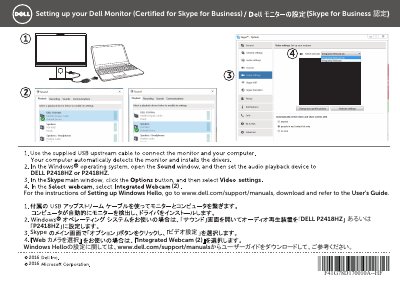
Dell P2418HZ Monitor Skype for Business Setup Guide
This two-page setup sheet from Dell explains how to set up the P2418HZ monitor, which is certified for Skype for Business. It shows which video input device to choose in Skype and points readers to the online user guide for Windows Hello setup.
The instructions are given in Japanese and Chinese on facing pages, with an English heading reading "Setting up your Dell Monitor (Certified for Skype for Business)". For Windows Hello configuration, the sheet directs users to www.dell.com/support/manuals to download the User's Guide. This manual is written in Japanese.
Dell P2418HZm specifications
| Screen Size | 60.47 cm (23.8 inches) |
|---|---|
| Resolution | 1920 x 1080 |
| Panel Type | TFT LCD |
| Webcam | 2MP Full HD |
| Speakers | 2 x 5W |
| VESA Mount | 100 mm x 100 mm |
| Power Consumption (Standby) | ≤0.3 W |
Source: Dell P2418HZm Monitor User Guide
All Dell P2418HZm documents by type
The shortest path to a working setup, usually only a few pages.
Disassembly, diagnostics and part numbers, for repair.
Day-to-day operation, settings and troubleshooting. Start here if the product is already set up.
- Dell P2418HZm Monitor User Guide 75 p
- Dell P2418HZm Monitor User Manual 79 p
- Dell P2418HZm Monitor User Guide 76 p
- Dell P2418HZm Monitor User's Guide 72 p
- Dell P2418HZm Monitor User Guide 78 p
- Dell P2418HZm Monitor User Manual 77 p
- Dell P2418HZm Display Manager User Guide 17 p
- Dell P2418HZm Monitor User's Guide 74 p
- Dell P2418HZm Monitor User Guide 74 p
Questions answered in these manuals
Which video input device should I select in Skype?
In the video input device selection, choose "Integrated Webcam (2)".
Where do I find instructions for setting up Windows Hello?
Go to www.dell.com/support/manuals, download the User's Guide and refer to it.
What torque setting should be used for the power screwdriver during disassembly?
The power screwdriver must be set to a torque of 6 kgF.cm.
What is the required torque for tightening screws with a Philips-head screwdriver?
Screws tightened with a Philips-head screwdriver require a torque of 6±1kgf.cm.
How do I unlock the monitor menu if it is locked?
Turn off the monitor, unplug the power cord, then plug it back in and turn the monitor on. If the OSD is locked, press the button above the power button for 6 seconds to unlock it.
What is the VESA mounting pattern for this monitor?
The monitor supports a VESA mounting pattern of 100 mm x 100 mm.