
Key facts
Start here
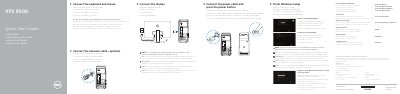
Dell XPS 8900 Quick Start Guide
This document serves as a Quick Start Guide for the Dell XPS 8900 computer. It provides multilingual instructions (English, Dutch, French, Portuguese, and Spanish) for the initial setup process, including connecting peripherals like the keyboard, mouse, and display, as well as configuring the network and power.
Read onlineDell XPS 8900 specifications
| Voltage | 100 V CA–240 V CA |
|---|---|
| Frequency | 50 Hz–60 Hz |
| Input Current Consumption | 8,0 A |
| Origin | China and Mexico |
| Regulatory Model | D14M |
| Regulatory Type | D14M002 |
| USB 3.0 Ports | 4 |
| Optical Drive Bays | 2 |
| Audio Ports | 6 |
Source: Dell XPS 8900 Quick Start Guide
All Dell XPS 8900 documents by type
Day-to-day operation, settings and troubleshooting. Start here if the product is already set up.
The shortest path to a working setup, usually only a few pages.
Disassembly, diagnostics and part numbers, for repair.
Questions answered in these manuals
What should you do after connecting the power cable?
Press the power button to turn on the computer.
What is the input voltage range for this computer?
The input voltage is 100 V AC–240 V AC.
What should I do if I ordered the computer with a discrete graphics card?
Connect the display to the discrete graphics card.
Where can I find product support and manuals?
Visit Dell.com/support.
What is the maximum memory capacity for the Dell XPS 8900?
The system supports a maximum of 64 GB of memory.
Which wireless standards does the computer support?
It supports Wi-Fi 802.11b/g/n/ac and Bluetooth 4.0.