
Dell OptiPlex 5040 SFF Quick Start Guide

The Dell OptiPlex 5040 Small Form Factor Quick Start Guide describes how to connect the keyboard and mouse, connect the network cable (optional), connect the power cable and press the power button, connect the display, and finish Windows 10 setup.
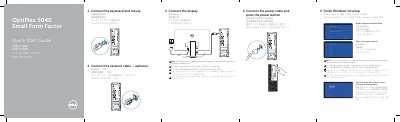

Dell OptiPlex 5040 SFF Quick Start Guide - cover page
Brand
DELL
Category
Desktops
Document type
Quick Start Guide
Language
English
Pages
2
File format
PDF
File size
595 KB
Published
25 November, 2023
Updated
25 November, 2023
MD5 checksum
EAE8FAE2EFDB27FE2D1553106A8E48A1

About this manual

This document provides a multilingual quick start guide for the Dell OptiPlex 5040 Small Form Factor (SFF) computer. It details the initial setup steps, including connecting the keyboard, mouse, network cable, power cable, and display. A specific note advises users who ordered a computer with a discrete graphics card to connect the display to that card instead of the motherboard port.

What's inside

  • Connect the keyboard and mouse
  • Connect the network cable
  • Connect the power cable
  • Connect the display
  • Finish Windows 10 setup
  • Enable Support and Protection
  • Connect to your network
  • Sign in to your Microsoft account
  • Locate Dell apps
  • Dell Product Registration

Frequently asked questions

Where should I connect the display if my computer has a discrete graphics card?

You should connect the display to the discrete graphics card.

What should I do if I am connecting to a secured wireless network?

Enter the password for the wireless network access when prompted.

Download PDF (595 KB)

More DELL Manuals


View all DELL manuals →