
Key facts
Start here
Dell Inspiron 1525 Laptop User Manual
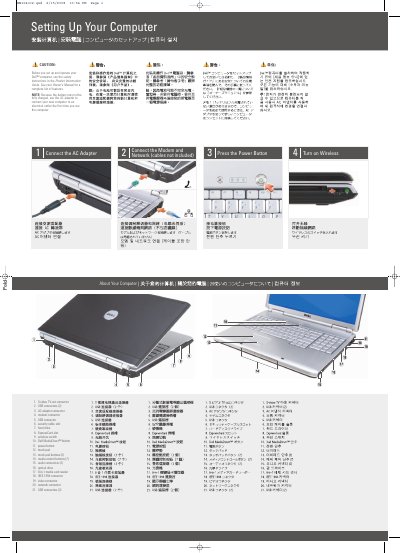
This document is a setup guide for the Dell Inspiron 1720/1721 notebook computer. It identifies the computer's external components and connectors and gives steps for connecting the AC adapter, modem, and network, pressing the power button, and turning on wireless.
It also includes an optional wireless network overview and directs readers to the Owner's Manual and Dell support for more information.
Dell Inspiron 1720 specifications
| Processor type | Intel® Core™ 2 Duo |
|---|---|
| L2 cache | 2 MB or 4 MB per core depending on model |
| External bus frequency | 667 MHz and 800 MHz |
| System chipset | Mobile Intel Express (GM 965 or PM 965) |
| Graphics bus | PCI-E X16 |
| ExpressCard controller | Intel ICH8M |
| ExpressCard slot | one ExpressCard slot (54 mm) |
| Memory card reader | 8-in-1 (SD, SDIO, MMC, Memory Stick, Memory Stick PRO, xD-Picture Card, Hi Speed-SD, Hi Density-SD) |
| Memory slots | two user-accessible SODIMM connectors |
| Memory type | 667 MHz SoDIMM DDR2 |
| Maximum memory | 4 GB |
| Video controller | Intel 965 GM |
| Video memory | up to 358 MB shared memory |
| Audio connectors | microphone connector, stereo headphone/speakers connector |
| USB ports | five 4-pin USB 2.0-compliant connectors |
| Network adapter | 10/100 Ethernet LAN on system board |
| Wireless options | WLAN, WWAN, WPAN Mini Cards; WWAN ExpressCard; Bluetooth® wireless technology |
All Dell Inspiron 1720 documents by type
The shortest path to a working setup, usually only a few pages.
Day-to-day operation, settings and troubleshooting. Start here if the product is already set up.
- Dell Inspiron 1720 Owner's Manual 226 p
- Dell Inspiron 1525 Laptop Setup and Operation Instructions 2 p
- Dell Inspiron 1720/1721 Setup and Operation Guide 2 p
- Dell Inspiron 1720/1721 Setup and Operation Guide 2 p
- Dell Inspiron 1720/1721 Setup and User Guide 2 p
- Dell Inspiron 1720 User Manual 202 p
- Dell Inspiron 1720 Notebook Owner's Manual 220 p
Disassembly, diagnostics and part numbers, for repair.
Questions answered in these manuals
Why should I use the AC adapter the first time I use the computer?
Because the battery may not be fully charged.
Where can I find more information about using the computer?
See the Owner's Manual; if you do not have a printed copy, click the Documentation and Support icon on the desktop or go to support.dell.com.
What should I do the first time I use the new computer?
Connect the AC adapter to an electrical outlet because the battery may not be fully charged.
From: Dell Inspiron 1525 Laptop Setup and Operation Instructions
What is required to set up a wireless network?
You need an internet service, a cable or DSL modem, and a wireless router.
From: Dell Inspiron 1525 Laptop Setup and Operation Instructions
What must be done the first time the computer is used?
You must use the AC adapter to connect the new computer to an electrical outlet because the battery may not be fully charged.
How can you tell if the power cord is properly connected?
A proper connection is indicated by a green LED light on the AC adapter.