
Dell Inspiron 1525 Laptop Setup and Operation Instructions

This document describes the setup and operation instructions for the Dell Inspiron 1525 laptop.
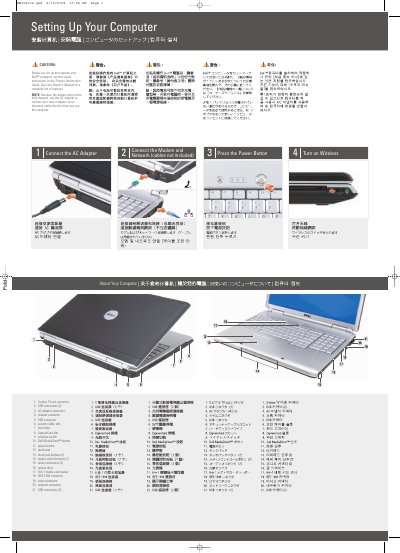

Dell Inspiron 1525 Laptop Setup and Operation Instructions - cover page
Brand
DELL
Category
Laptops
Document type
User Manual
Language
English
Pages
2
File format
PDF
File size
1000 KB
Published
24 November, 2023
Updated
24 November, 2023
MD5 checksum
8B0D7434D876D1EA9FCD46328283D705

About this manual

This document serves as a setup and operation guide for the Dell Inspiron 1720/1721 laptop. It details the initial steps for connecting the AC adapter and setting up the computer for the first time, including identifying key hardware ports and buttons. The guide also covers basic operations such as turning on the wireless switch and connecting to a modem or network.

What's inside

  • Setting Up Your Computer
  • About Your Computer
  • Connect the Modem and Network
  • Turn on Wireless
  • Wireless Network (Optional)

Frequently asked questions

What should I do the first time I use the new computer?

Connect the AC adapter to an electrical outlet because the battery may not be fully charged.

What is required to set up a wireless network?

You need an internet service, a cable or DSL modem, and a wireless router.

Download PDF (1000 KB)

More DELL Manuals


View all DELL manuals →