
Key facts
Start here
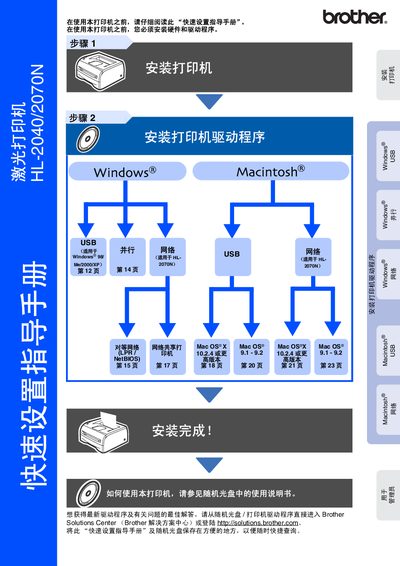
Brother HL-2040/2070N Laser Printer Quick Setup Guide
This document is a Quick Setup Guide for the Brother HL-2040 and HL-2070N laser printers. It covers essential steps to get the printer running, including unpacking, installing the toner unit, loading paper, and connecting via USB, parallel, or network interfaces.
The guide provides specific instructions for installing drivers on Windows (98/Me/2000/XP) and Mac OS (9.1-9.2 and X 10.2.4+). It also includes a section for administrators to install the BRAdmin Professional utility and configure network settings using a web browser. This manual is written in Chinese.
All Brother HL-2040/2070N documents by type
Day-to-day operation, settings and troubleshooting. Start here if the product is already set up.
Questions answered in these manuals
What is the maximum length allowed for a USB cable?
The guide states that you must not use a USB interface cable longer than 2.0 meters.
What is the default password for the Brother print server?
The default password for the user name 'admin' is 'access'.