
Key facts
- Brand
- Honeywell
- Model
- AutoRAE 2 Cradle
- Category
- Other device
- Industry
- Industrial
- Documents
- 2
- Languages
- EN
- Last added
- 2026-11-16
Start here
Honeywell AutoRAE 2 Controller and AutoRAE 2 Cradle(s) User Manual
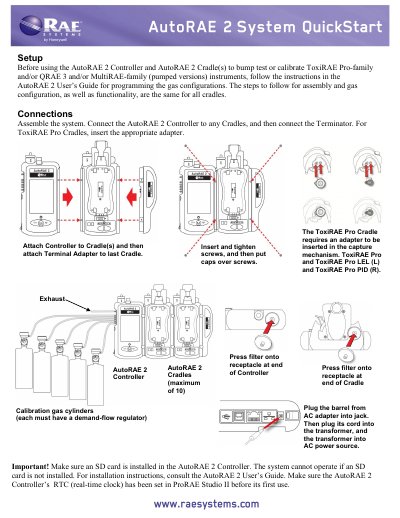
This manual explains how to assemble, connect, and operate the Honeywell AutoRAE 2 Controller and Cradle(s) for bump testing and calibrating compatible gas detection instruments. It covers system setup, gas configuration, instrument placement, bump testing, calibration, and printing reports. The system requires an SD card and proper RTC setup before first use. The display uses color-coded status indicators for test results and instrument readiness.
Read onlineAll Honeywell AutoRAE 2 Cradle documents by type
Day-to-day operation, settings and troubleshooting. Start here if the product is already set up.
Questions answered in these manuals
How do I perform a bump test with the AutoRAE 2 Cradle?
Insert an instrument in the AutoRAE 2 Cradle and press "Bump"; if the instrument is warmed up, the bump test begins.
What happens if an instrument fails a bump test?
The AutoRAE 2 Cradle automatically begins a full calibration.
What instruments can the AutoRAE 2 Controller and Cradles bump test or calibrate?
The system is used to bump test or calibrate ToxiRAE Pro-family and/or QRAE 3 and/or MultiRAE -family (pumped versions) instruments.
From: Honeywell AutoRAE 2 Controller and AutoRAE 2 Cradle(s) User Manual
How many AutoRAE 2 Cradles can be connected to the controller?
The system supports a maximum of 10 AutoRAE 2 Cradles.
From: Honeywell AutoRAE 2 Controller and AutoRAE 2 Cradle(s) User Manual