
AutoRAE 2 Controller and AutoRAE 2 Cradle(s) are devices provided by Honeywell for bump testing or calibrating ToxiRAE Pro-family and/or QRAE 3 and/or MultiRAE-family (pumped versions) instruments.
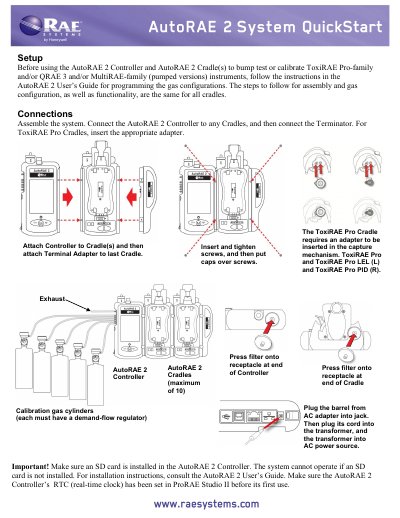
This manual explains how to assemble, connect, and operate the Honeywell AutoRAE 2 Controller and Cradle(s) for bump testing and calibrating compatible gas detection instruments. It covers system setup, gas configuration, instrument placement, bump testing, calibration, and printing reports. The system requires an SD card and proper RTC setup before first use. The display uses color-coded status indicators for test results and instrument readiness.
The system is used to bump test or calibrate ToxiRAE Pro-family and/or QRAE 3 and/or MultiRAE -family (pumped versions) instruments.
The system supports a maximum of 10 AutoRAE 2 Cradles.
If an instrument does not pass a bump test, a full calibration is automatically started.