
Instructions for setting up and using the Honeywell AutoRAE 2 Cradle to bump test, calibrate, charge, and print reports for compatible gas monitors.
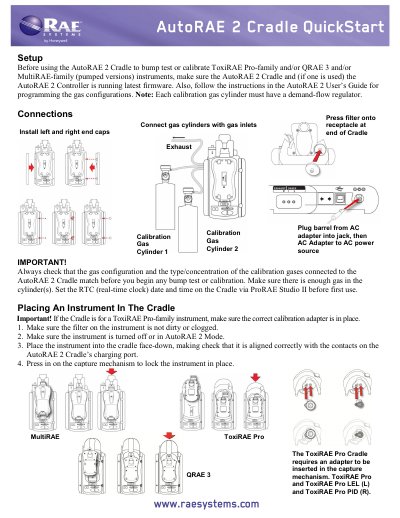
The Honeywell AutoRAE 2 Cradle is used to bump test and calibrate compatible gas monitors, including ToxiRAE Pro-family, QRAE 3, and pumped MultiRAE-family instruments. The document covers setup, gas and electrical connections, placing an instrument in the cradle, automatic warm-up, bump testing, calibration, status messages, removal, battery charging, and printing reports.
Before use, the cradle and controller firmware should be current, gas configurations and calibration gases should match, and the real-time clock should be set via ProRAE Studio II. The cradle charges a docked instrument and can send bump test or calibration reports to a connected serial printer.
Insert an instrument in the AutoRAE 2 Cradle and press "Bump"; if the instrument is warmed up, the bump test begins.
The AutoRAE 2 Cradle automatically begins a full calibration.
Use G8; G1 through G7 are not supported.
Press the button to release the capture mechanism, then lift the instrument from its inlet end.