
Key facts
- Brand
- Honeywell
- Model
- 120
- Industry
- Industrial
- Documents
- 4
- Languages
- EN · ZH
- Last added
- 2026-10-27
Start here
Honeywell Pilot Micro 120 Quick Start Guide
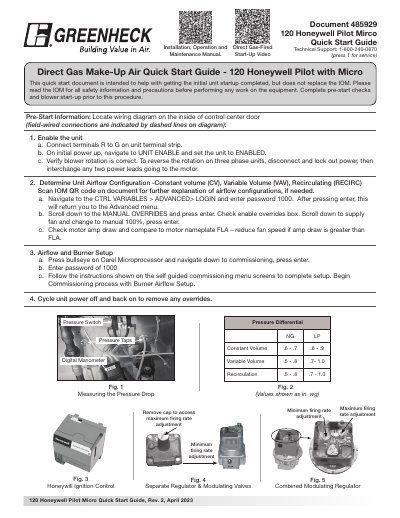
This document serves as a Quick Start Guide for the Honeywell Pilot Micro 120, providing essential instructions for initial unit startup. It covers pre-start information, including enabling the unit and verifying blower rotation, as well as determining the correct airflow configuration (Constant Volume, Variable Volume, or Recirculating).
Read onlineHoneywell 120 specifications
| Maximum subsystems | 8 |
|---|---|
| Maximum zones per system | 15 |
| Default keypad address | 00 |
| Serial module model | 4100SM |
Source: Honeywell VISTA-120 Security System Quick Programming Operation Manual
All Honeywell 120 documents by type
The shortest path to a working setup, usually only a few pages.
Day-to-day operation, settings and troubleshooting. Start here if the product is already set up.
Questions answered in these manuals
How do I enable the Honeywell Pilot Micro 120 unit?
Connect terminals R to G on the unit terminal strip, navigate to UNIT ENABLE to set the unit to ENABLED, and verify that blower rotation is correct.
What is the password for the advanced menu?
Enter the password 1000 to access the advanced menu and manual overrides.
How do I set the programming keypad address?
Power on the unit and hold keys 1 and 3 for 5 seconds; the keypad will show Addr=31 or Addr=00, then enter the desired address (e.g., 01) and press the * key.
From: Honeywell VISTA-120 Security System Quick Programming Operation Manual
How do I enter programming mode?
Enter the installer password 4140 followed by 8000; the keypad will display “Program Mode”.
From: Honeywell VISTA-120 Security System Quick Programming Operation Manual
What is the IP rating of the scanner?
The Voyager 1200g has an IP42 rating, providing immunity to foreign particles and dripping water.
From: Honeywell Voyager 1200g Single-Line Laser Scanner User’s Guide
What safety precautions should be taken with the laser?
Do not stare into the laser beam. This is a Class 2 laser product with a maximum output of 1.0 mW.
From: Honeywell Voyager 1200g Single-Line Laser Scanner User’s Guide