
Key facts
- Brand
- DELL
- Model
- Vostro 20 3000 Series
- Category
- All-in-One Desktops
- Documents
- 5
- Languages
- EN · ZH
- Last added
- 2023-11-20
Start here
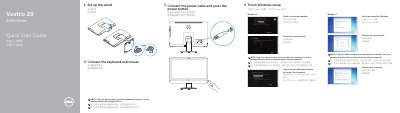
Dell Vostro 20 3000 Series Quick Start Guide
Quick Start Guide 2 pages · 1.1 MB · EN
This document serves as a Quick Start Guide for the Dell Vostro 20 3000 Series desktop computer. It outlines the initial steps to set up the device, including installing the stand, connecting peripherals like the keyboard and mouse, and powering on the system. The guide also covers specific setup procedures for Windows 7 and Windows 8 operating systems, such as setting up passwords, connecting to networks, and enabling security updates.
Read onlineDell Vostro 20 3000 Series specifications
| Regulatory model | W15B |
|---|---|
| Regulatory type | W15B001 |
| Computer model | Vostro 20-3055 series |
| Optical drive | Optional |
All Dell Vostro 20 3000 Series documents by type
Quick Start Guide 5
The shortest path to a working setup, usually only a few pages.
Questions answered in these manuals
Is the optical drive included?
The optical drive is optional.
What is the regulatory model number for this computer?
The regulatory model number for this computer is W15B.
What is the computer model listed on the guide?
The computer model listed is the Vostro 20-5450 series.
Where can I find the Owner's Manual?
See the Owner's Manual at dell.com/support.
Where can I find product support and manuals?
Product support and manuals are available at dell.com/support.