
Key facts
Start here
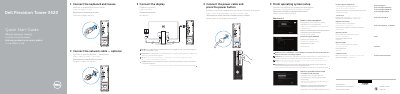
Dell Precision Tower 3420 Quick Start Guide
This guide helps you set up your Dell Precision Tower 3420 quickly. It covers connecting peripherals, setting up Windows, connecting to a network, and enabling security features. Optional components like SD card readers or VGA ports are also listed with their locations.
The guide includes multilingual instructions and notes for users connecting to secured wireless networks or upgrading from Windows 7 to Windows 10. It also references Dell’s support resources for drivers and troubleshooting.
Dell Precision Tower 3420 specifications
| Processor type | Intel Core i3/i5/i7 series, Intel Xeon E3 |
|---|---|
| Total Cache | Up to 8 MB |
| Memory Type | DDR4, NECC, and ECC |
| Memory Speed | 2133 MHz |
| Maximum Memory | 64GB |
| Integrated Video | Intel HD Graphics 530 |
Source: Dell Precision Tower 3420 Desktop Computer Owner's Manual
All Dell Precision Tower 3420 documents by type
The shortest path to a working setup, usually only a few pages.
Day-to-day operation, settings and troubleshooting. Start here if the product is already set up.
Questions answered in these manuals
How do I connect to a secured wireless network?
Enter the password for the wireless network access when prompted.
What should I do if I’m upgrading from Windows 7 32-bit to Windows 10?
You will need to manually install the system drivers. Visit dell.com/support for the latest drivers.
What should I do if I am connecting to a secured wireless network?
Enter the password for the wireless network access when prompted.
Where can I find the latest drivers for my computer?
Visit dell.com/support for the latest drivers.
What should I do if I am connecting to a secured wireless network?
Enter the password for the wireless network access when prompted.
Where can I find the latest drivers for my computer?
Visit dell.com/support for the latest drivers.