
Key facts
- Brand
- DELL
- Model
- AD211
- Category
- Other Electronics
- Documents
- 6
- Languages
- ZH · EN
- Last added
- 2026-10-25
Start here
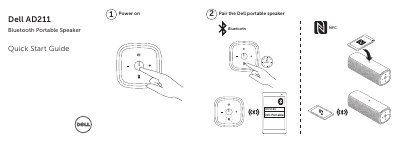
Dell AD211 Bluetooth Portable Speaker Quick Start Guide
This document is a Quick Start Guide for the Dell AD211 Bluetooth Portable Speaker. It provides instructions on pairing the device with other devices and powering it on. The guide also lists the features included in the box and describes the functions of the speaker's buttons and ports.
Read onlineDell AD211 specifications
| Radio Frequency | 2.4GHz ISM |
|---|---|
| Wireless Range | 10m |
| Warranty | 1 year limited hardware warranty |
All Dell AD211 documents by type
Day-to-day operation, settings and troubleshooting. Start here if the product is already set up.
The shortest path to a working setup, usually only a few pages.
Questions answered in these manuals
How long should I charge the battery before first use?
You should fully charge the battery for six hours before using the speaker for the best results.
How do I know if the battery is fully charged?
The LCD display on the power button will turn solid white when the battery is fully charged.
What type of device is the Dell AD211?
A Bluetooth portable speaker.
From: Dell AD211 Bluetooth Portable Speaker Quick Start Guide
What charging feature is listed?
A charging port.
From: Dell AD211 Bluetooth Portable Speaker Quick Start Guide
What is the Dell AD211 portable speaker used for?
It is a Bluetooth portable speaker with a microphone for answering incoming calls.
From: Dell AD211 Bluetooth Portable Speaker Quick Start Guide
How do you pair the Dell portable speaker?
Follow the “Pair the Dell portable speaker” step in the quick start guide.
From: Dell AD211 Bluetooth Portable Speaker Quick Start Guide