
Key facts
- Brand
- Cisco
- Model
- 8800 Series
- Category
- Router
- Industry
- Electronics
- Documents
- 4
- Languages
- EN · ZH
- Last added
- 2026-11-15
Start here
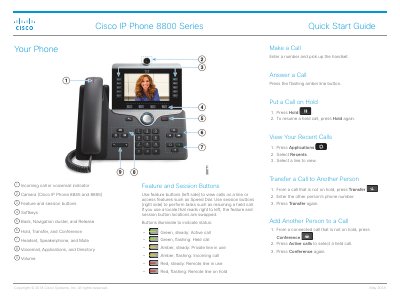
Cisco IP Phone 8800 Series Quick Start Guide
This quick start guide covers basic operation of the Cisco IP Phone 8800 Series, including making and answering calls, hold, transfer, conference, headset and speakerphone use, mute, voicemail, call forwarding, and volume, ringtone, brightness, and font size settings.
It also describes feature and session button indicators and pairing a mobile device on supported models (8851, 8861, and 8865), plus stopping video on models with a camera (8845 and 8865).
Cisco 8800 Series specifications
| Cisco 8804 form factor | 4-slot 10RU modular router with 57.6 Tbps network bandwidth |
|---|---|
| Cisco 8818 form factor | 33-RU modular router supporting distributed forwarding across FRUs |
| Cisco 8812 form factor | 21-RU modular router supporting distributed forwarding across FRUs |
| Cisco 8808 form factor | 16-RU modular router supporting distributed forwarding across FRUs |
| PSU4.8KW-DC100 nominal input voltage | 48 V 100 A DC |
| PSU4.8KW-DC100 input tolerance | -40 to -75 VDC |
| Cisco 8818 power trays | Up to six power trays |
| Operating temperature | Up to 40 °C at sea level |
Source: Cisco 8800 Series Routers Hardware Installation Guide
All Cisco 8800 Series documents by type
Day-to-day operation, settings and troubleshooting. Start here if the product is already set up.
Mounting, wiring and first power-up. Read it before the hardware goes in.
The shortest path to a working setup, usually only a few pages.
Questions answered in these manuals
What happens if power is interrupted?
Access to emergency service through the phone does not function until power is restored.
What external devices are recommended?
Good-quality external devices shielded against unwanted radio frequency and audio frequency signals.
What is the rack-unit height of the Cisco 8804 router?
The Cisco 8804 is a 10-RU modular router.
What input voltage does the PSU4.8KW-DC100 power supply accept?
It accepts a nominal 48 V 100 A DC input.
What happens to emergency calls if the power goes out?
Emergency calls will not work until power is restored because the phone requires power to request emergency services.
What steps should be taken if external equipment causes noise during calls?
You should move the peripheral away from RF or AF signal sources and use shielded cables or ferrite cores.