
Key facts
Start here
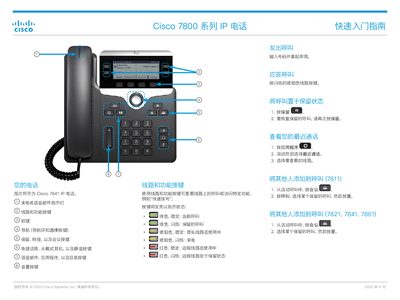
Cisco 7800 Series IP Phone Quick Start Guide
The Cisco 7800 Series IP Phone Quick Start Guide provides step‑by‑step instructions for using the phone’s basic features, such as dialing, call handling, voicemail, and adjusting audio and screen settings. It is intended to help users become familiar with the device quickly.
The guide covers line and feature keys, making and transferring calls, using headsets or hands‑free microphones, muting, adjusting call and ring volumes, changing ringtones, and customizing screen contrast and backlight. A link to the full user manual is also provided. This manual is written in Chinese.
All Cisco 7800系列 documents by type
Day-to-day operation, settings and troubleshooting. Start here if the product is already set up.
The shortest path to a working setup, usually only a few pages.
Questions answered in these manuals
Can I use the headset feature on the Cisco 7811 IP phone?
No, the Cisco 7811 IP phone does not support headsets.
What happens if I try to forward all calls in a loop?
The system ignores the 'forward all calls' configuration and the call rings.
How do I place a call on a Cisco 7800 series IP phone?
Pick up the handset, enter the number, and press the call button.
How do I transfer a call to another person?
From an active call, press the Transfer button, enter the other party’s number, then press Transfer again.