
Key facts
Start here
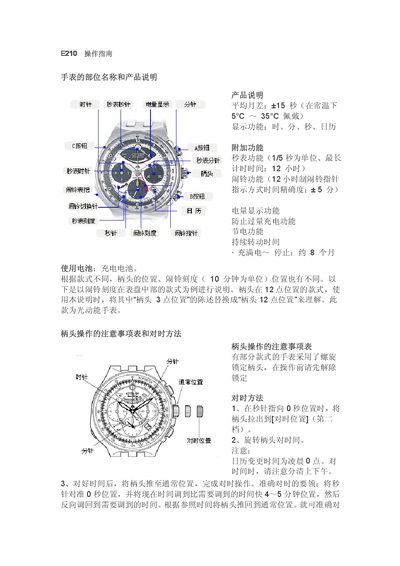
Casio E210 Watch User Manual
This manual describes the parts of the Casio E210 watch and explains its basic functions such as time display, date, and month correction. It also covers additional features like the stopwatch and world‑time mode.
Detailed procedures are given for setting the time, adjusting the date, using the stopwatch, and interpreting the power‑reserve warning. Safety notes and operation tips for different watch styles are included. This manual is written in Chinese.
Casio E210 specifications
| Average monthly deviation | +15 seconds |
|---|---|
| Stopwatch resolution | 1/5 second |
| Power‑reserve warning | Activates when battery low |
Source: Casio E210 Watch User Manual
All Casio E210 documents by type
Day-to-day operation, settings and troubleshooting. Start here if the product is already set up.
Questions answered in these manuals
How is the stopwatch operated?
Press the A button to start or stop the stopwatch; after stopping, press A again to reset the hands to zero.
What does the power‑reserve warning indicate?
When the battery level is low, the watch shows a power‑reserve warning and the second hand starts ticking at a 2‑second interval, disabling the stopwatch and world‑time functions.
How do I set the time on the Casio E210?
Pull the crown to the second position when the second hand is at 0 seconds, rotate it to set the time, then push it back to the normal position.
How do I set the date?
Pull the crown to the first position and turn it left to set the date; avoid adjusting between 9:00 p.m. and 1:00 a.m.