
E210 is a CASIO solar-powered watch with stopwatch, alarm, and power display functions
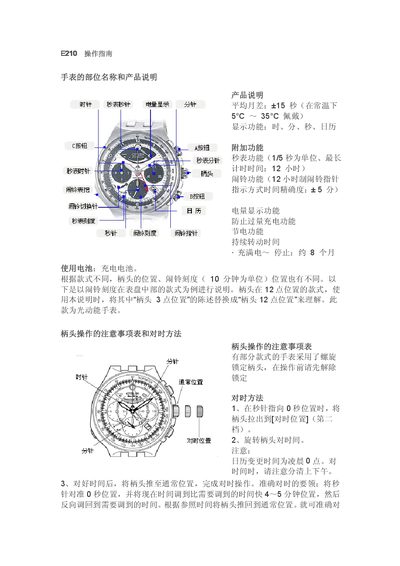
This manual describes the parts of the Casio E210 watch and explains its basic functions such as time display, date, and month correction. It also covers additional features like the stopwatch and world‑time mode.
Detailed procedures are given for setting the time, adjusting the date, using the stopwatch, and interpreting the power‑reserve warning. Safety notes and operation tips for different watch styles are included. This manual is written in Chinese.
| Average monthly deviation | +15 seconds |
|---|---|
| Stopwatch resolution | 1/5 second |
| Power‑reserve warning | Activates when battery low |
Press the A button to start or stop the stopwatch; after stopping, press A again to reset the hands to zero.
When the battery level is low, the watch shows a power‑reserve warning and the second hand starts ticking at a 2‑second interval, disabling the stopwatch and world‑time functions.