
Key facts
- Brand
- Yamaha
- Model
- REV5
- Industry
- Appliances
- Documents
- 3
- Languages
- EN
- Last added
- 2012-07-03
Start here
Yamaha REV5 Reverb Unit User Programming Table
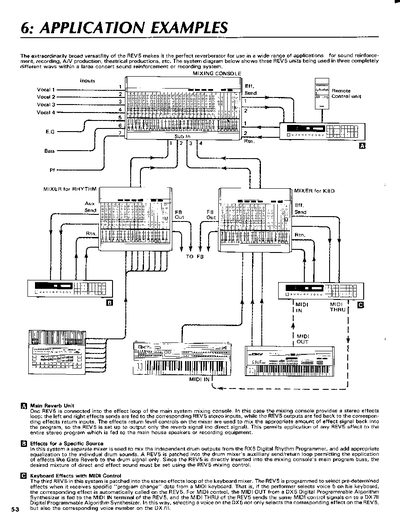
This document serves as a technical reference for the Yamaha REV5 digital reverb unit. It provides detailed electrical characteristics, including frequency response, dynamic range, and MIDI control capabilities. The text includes specific instructions on how to patch the unit into various audio systems, such as mixing consoles and keyboard mixers.
Read onlineYamaha REV5 specifications
| A/D and D/A converters | 20-bit |
|---|---|
| Sampling rate | 44.1 kHz |
| Preset programs | 100 |
| User memory capacity | 100 programs |
| Inputs and outputs | two inputs and two outputs |
All Yamaha REV5 documents by type
Day-to-day operation, settings and troubleshooting. Start here if the product is already set up.
Questions answered in these manuals
How often should the backup battery be replaced?
Yamaha recommends having the battery replaced by a qualified service center every five years to prevent data loss.
What happens if the backup battery voltage falls below a certain level?
The message 'LOW BATTERY' will appear in the LCD when you turn the unit on, indicating that user memory contents have been lost.
What are the input and output channel configurations?
The unit features two balanced XLR inputs, two balanced TRS phone inputs, and two balanced XLR outputs.
How does MIDI control work for effect selection?
Effects are selected by sending a specific 'program change' number via MIDI, allowing automatic recall of presets.
What should I do if the REV500 causes interference with other devices?
Relocate the REV500 or the affected device, use a different circuit, or install an AC line filter as suggested by the FCC notice.
How do I turn the REV500 on and off?
Use the POWER switch on the rear panel; it turns the unit on and off.