
Key facts
- Brand
- SONY
- Model
- NWZ-W273
- Category
- Other Electronics
- Industry
- Electronics
- Documents
- 2
- Languages
- ZH
- Last added
- 2026-10-10
Start here
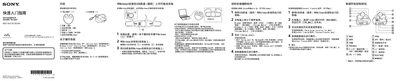
Sony Walkman NWZ-W273S/W274S Quick Start Guide
The guide walks you through the package contents, how to install the Walkman onto the supplied USB base, connect it to a Windows or Mac computer, and install the WALKMAN Guide and Media Go software. It also explains basic operation such as power on/off, playback controls, and how to adjust the neck strap and earphones.
Additional sections cover charging procedures, battery specifications, troubleshooting steps when the device is not recognized, safety warnings for ear‑phone use, volume‑level alerts, and warranty information. This manual is written in Chinese.
All Sony NWZ-W273 documents by type
Day-to-day operation, settings and troubleshooting. Start here if the product is already set up.
The shortest path to a working setup, usually only a few pages.
Questions answered in these manuals
How long does it take to fully charge the Walkman?
It takes approximately 1.5 hours to fully charge the battery when connected via the USB dock.
What should I do if my computer cannot recognize the Walkman?
Ensure the device is correctly and firmly connected to the USB dock, check if the battery needs charging, or restart your computer.
What should I do if the computer does not recognize the Walkman?
Make sure the Walkman is correctly and firmly installed in the USB base, then reconnect the base to the computer; you may need to remove and re‑install the device.