
Key facts
- Brand
- Sharp
- Model
- VN-EZ1
- Documents
- 5
- Languages
- EN
- Last added
- 2012-08-02
Start here
Sharp VN-EZ1U MPEG-4 Digital Recorder Operation Guide
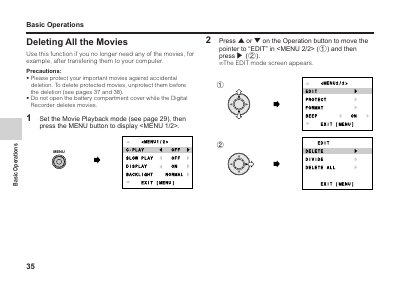
This manual provides instructions for operating the Sharp VN-EZ1U MPEG-4 Digital Recorder. It details how to manage recorded content, including procedures for deleting all movies or specific still images one by one.
The guide also explains how to protect important movies and images from accidental deletion and describes the process for viewing still images in playback mode using the LCD monitor.
All Sharp VN-EZ1 documents by type
Day-to-day operation, settings and troubleshooting. Start here if the product is already set up.
Mounting, wiring and first power-up. Read it before the hardware goes in.
Questions answered in these manuals
What voltage of SmartMedia card must be used with PixLab?
You must use a 3.3V SmartMedia card for the software to operate.
What program is required to read the Readme.txt file?
The Readme.txt file can be read using the Notepad program provided with Windows.
Can I delete protected movies?
No, you must unprotect them first. Protected movies cannot be deleted until the protection is removed.
How do I view a still image in full size?
Navigate to the desired image using the Operation buttons and press the Shutter button.
What is required to use PixLab software?
Users must already understand how to use Microsoft Windows and the mouse.
How do I transfer files from VN-EZ1?
Remove the SmartMedia card from the camera and load it into a computer using a Floppy Disk Adapter or PC Card Adapter.