
Sharp VN-EZ1U MPEG-4 Digital Recorder Operation Guide

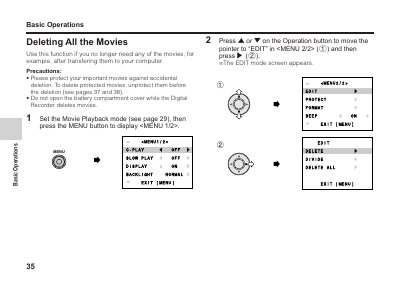
This section explains how to delete all recorded movies.

Sharp VN-EZ1U MPEG-4 Digital Recorder Operation Guide - cover page
Brand
Sharp
Category
Digital cameras
Document type
User Manual
Language
English
Pages
49
File format
PDF
File size
628 KB
Published
02 August, 2012
Updated
30 September, 2023
Models
VNEZ1U, VN-EZ1
MD5 checksum
9C626FBD1C2841A7B91E6AA0114C8243

About this manual

This manual provides instructions for operating the Sharp VN-EZ1U MPEG-4 Digital Recorder. It details how to manage recorded content, including procedures for deleting all movies or specific still images one by one.

The guide also explains how to protect important movies and images from accidental deletion and describes the process for viewing still images in playback mode using the LCD monitor.

What's inside

  • Deleting All Movies
  • Protecting Important Movie and Images
  • Still Playback
  • Deleting Unwanted Still Image One by One

Frequently asked questions

Can I delete protected movies?

No, you must unprotect them first. Protected movies cannot be deleted until the protection is removed.

How do I view a still image in full size?

Navigate to the desired image using the Operation buttons and press the Shutter button.

Download PDF (628 KB)

More Sharp Manuals


View all Sharp manuals →