
Key facts
- Brand
- Cisco
- Model
- 8845
- Category
- Telephone
- Industry
- Electronics
- Documents
- 3
- Languages
- EN
- Last added
- 2026-11-23
Start here
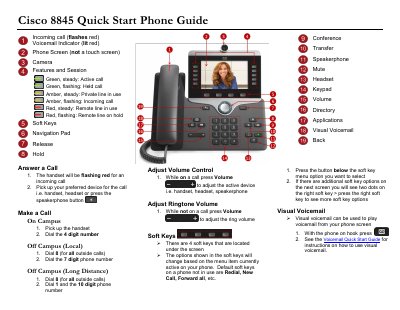
Cisco 8845 IP Phone Quick Start Guide
This quick start guide covers the Cisco 8845 IP phone. It explains basic operations such as answering and placing on-campus and off-campus calls, adjusting volume and ringtone volume, and using the phone's soft keys.
The guide also describes the navigation pad, speakerphone and headset calls, hold, conference, transfer, video mute, recent calls, microphone mute, ringtone and brightness settings, call forwarding, voicemail, font size, release, directory, and speed dial setup via the portal.
Cisco 8845 specifications
| Display | 5-inch high-resolution (800 x 480) widescreen VGA backlit color display |
|---|---|
| Video | 720p HD two-way video (encode and decode) |
| Audio Codec | G.711a-law and mu-law, G.722, G.729a, iLBC, iSAC |
| Bluetooth | Bluetooth 4.1 LE, Enhanced Data Rate (EDR) Class 1 |
| Ethernet | Built-in 2-port Cisco Ethernet switch |
| Operating Temperature | 32 to 104°F (0 to 40°C) |
| Weight | 2.97 lb (1.35 kg) with handset |
| Dimensions | 9.01 x 10.13 x 3.87 in. (228.78 x 257.34 x 98.39 mm) |
All Cisco 8845 documents by type
The shortest path to a working setup, usually only a few pages.
Day-to-day operation, settings and troubleshooting. Start here if the product is already set up.
Questions answered in these manuals
What video resolution does the Cisco IP Phone 8845 support?
It supports 720p HD two-way video (encode and decode).
What audio codecs are supported?
It supports G.711a-law and mu-law, G.722, G.729a, iLBC, and iSAC.
How do I answer an incoming call on the Cisco 8845?
When the handset flashes red, pick up the handset or headset, or press the speakerphone button.
How do I forward all calls to voicemail?
Press the soft key for Forward all, then press Voicemail.
How do I set up voicemail on the Cisco 8845 IP Phone?
Press the line button for your extension, then press Messages. Enter your default PIN (1234) and follow prompts to record your name, greeting, and new PIN.
How do I make a video call?
Turn the camera shutter ring clockwise to open the camera, optionally press Self-View to adjust perspective, then make the call using the 'Make a Call' options.