
This Cisco 8845 IP Phone Quick Start Guide explains how to answer and make calls, adjust volume and ringtones, use soft keys and voicemail, and manage calls.
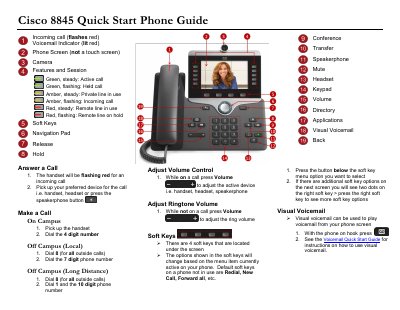
This quick start guide covers the Cisco 8845 IP phone. It explains basic operations such as answering and placing on-campus and off-campus calls, adjusting volume and ringtone volume, and using the phone's soft keys.
The guide also describes the navigation pad, speakerphone and headset calls, hold, conference, transfer, video mute, recent calls, microphone mute, ringtone and brightness settings, call forwarding, voicemail, font size, release, directory, and speed dial setup via the portal.
| Soft keys | 4 |
|---|---|
| Phone screen | Not a touch screen |
When the handset flashes red, pick up the handset or headset, or press the speakerphone button.
Press the soft key for Forward all, then press Voicemail.
Press Applications, select Settings > Brightness, use the navigation pad to decrease or increase brightness, then press Save.
Speed dial numbers are set using the portal at https://cucm1.voip.uwosh.edu/ucmuser/.