
User guide for Cisco 8845 IP Phone covering call handling, voicemail, video calls, and directory access.
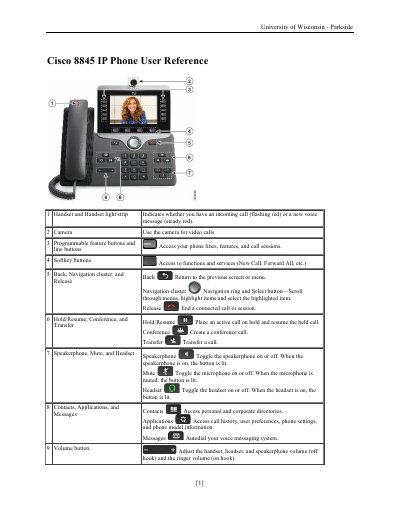
This manual provides step-by-step instructions for using the Cisco 8845 IP Phone, including making and receiving calls, managing voicemail, setting up conference calls, and using video features. It also covers navigating menus, adjusting settings, and using programmable buttons. The guide is designed for end users to operate the phone effectively in a corporate or enterprise environment.
Key features include softkey navigation, programmable line buttons, video calling with camera controls, and call forwarding options. The manual includes detailed procedures for enrolling in voicemail, managing messages, and using the Corporate Directory for contact lookup.
Press the line button for your extension, then press Messages. Enter your default PIN (1234) and follow prompts to record your name, greeting, and new PIN.
Turn the camera shutter ring clockwise to open the camera, optionally press Self-View to adjust perspective, then make the call using the 'Make a Call' options.
Press Transfer, dial the extension, then press Transfer again. You can choose blind, announced, or direct-to-voicemail transfers.
Press Contacts, select Corporate Directory, choose a search criteria, enter your search, press Submit, select the contact, and press Call.