
Key facts
- Brand
- Logitech
- Model
- 950
- Industry
- Electronics
- Documents
- 3
- Languages
- EN
- Last added
- 2026-10-22
Start here
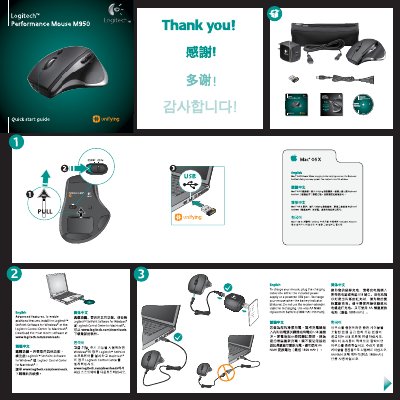
Logitech Performance Mouse M950 Quick Start Guide
This guide explains how to get the Logitech Performance Mouse M950 up and running. It includes instructions for installing the Logitech SetPoint software (Windows) or Logitech Control Center (Mac), charging the mouse, and using the Unifying receiver.
The document also provides troubleshooting steps for pointer issues, battery problems, and receiver connectivity, plus contact information for Logitech support.
Logitech 950 specifications
| Battery type | AA NiMH (1800 mAh minimum) |
|---|---|
| Charging method | Charge via included power supply or a powered USB port |
| Receiver type | Logitech Unifying receiver |
All Logitech 950 documents by type
Day-to-day operation, settings and troubleshooting. Start here if the product is already set up.
The shortest path to a working setup, usually only a few pages.
Questions answered in these manuals
How do I restart the Harmony remote?
Press and hold the Off button for 15 seconds or until the Logitech logo appears on the display.
What happens if the battery drops below 20%?
The battery meter will automatically be displayed on the screen.
What additional item comes with the BCC950 ConferenceCam?
The package includes an optional USB power cable that connects to a computer USB port and the speakerphone base.
What happens if you plug the USB power cable into a non-powered hub?
Plugging the cable into a non-powered USB port or hub could prevent your ConferenceCam from functioning properly.
How do I charge the mouse?
Plug the charging cable into the included power supply or a powered USB port; the battery indicator will blink red when charging.