
Key facts
- Brand
- Logitech
- Model
- MK270
- Category
- Other Computer Accessories
- Industry
- Computers
- Documents
- 2
- Languages
- EN
- Last added
- 2022-09-06
Start here
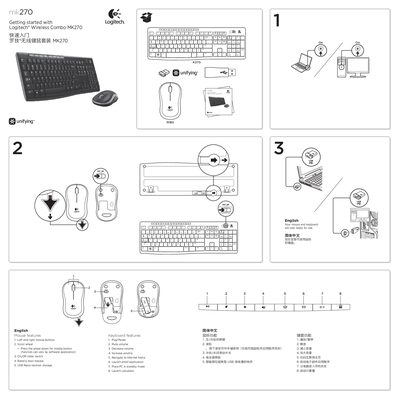
Logitech MK270 Wireless Combo Quick Start Guide
This guide helps you get the Logitech MK270 wireless combo up and running quickly. It describes the mouse and keyboard features, battery installation, and how to use the Logitech Unifying receiver.
Key sections include mouse features, keyboard shortcuts, step‑by‑step setup help, and instructions for pairing additional Unifying‑compatible devices. Battery requirements and troubleshooting tips are also provided.
Logitech MK270 specifications
| Mouse battery type | 1 AA alkaline battery |
|---|---|
| Keyboard battery type | 2 AAA alkaline batteries |
| Maximum devices per Unifying receiver | Up to 6 devices |
All Logitech MK270 documents by type
Day-to-day operation, settings and troubleshooting. Start here if the product is already set up.
The shortest path to a working setup, usually only a few pages.
Questions answered in these manuals
What batteries are required for the mouse and keyboard?
The mouse uses one AA alkaline battery and the keyboard uses two AAA alkaline batteries.
How many wireless devices can be connected to one Unifying receiver?
You can connect up to six devices using only one USB port.
What batteries does the MK270 mouse require?
The mouse uses one AA alkaline battery.
How many devices can be paired with the Unifying receiver?
Up to six devices can be paired with a single Unifying receiver.