
Key facts
- Brand
- Logitech
- Model
- M185
- Category
- Mouse keyboard
- Industry
- Computers
- Documents
- 2
- Languages
- ZH · EN
- Last added
- 2026-11-13
Start here
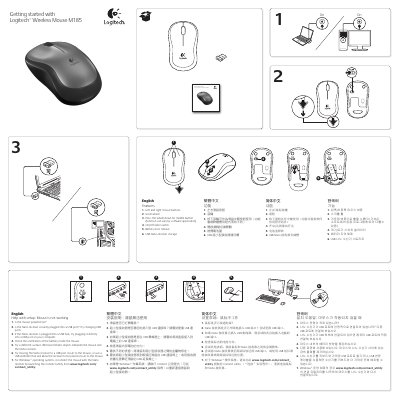
Logitech M185 Wireless Mouse Getting Started Guide
The Logitech M185 wireless mouse guide identifies the left and right buttons, scroll wheel with middle-button function, on/off switch, battery door release, and USB Nano receiver storage. It also provides setup help for a mouse that is not working, including power, receiver connection, battery orientation, surface, and reconnection steps.
Additional sections list Logitech addresses and phone numbers, warranty information for Australia, ergonomics guidance, battery and power warnings, compliance information, and device pairing limits. The guide states an operating temperature range of 5°C to 40°C (41°F to 104°F) and that the product contains a Class 1 LED. This manual is written in Chinese.
All Logitech M185 documents by type
The shortest path to a working setup, usually only a few pages.
Questions answered in these manuals
What should I check if the Logitech M185 mouse is not working?
Check that the mouse is powered on, the Nano receiver is securely plugged in, the battery orientation is correct, the surface is suitable, and reconnect using the Connect utility on Windows if needed.
What is the operating temperature range of the Logitech M185?
The operating temperature range is 5°C to 40°C (41°F to 104°F).
What should I do if the Logitech M185 mouse is not working?
Check that the mouse is powered on, the Nano receiver is securely plugged into a USB port, the battery orientation is correct, and try a different surface; for Windows, reconnect using the Connect utility.
What is the operating temperature range for the M185?
The operating temperature range is 5° C (41° F) to 40° C (104° F).