
Honeywell Pilot Micro 120 Quick Start Guide

Installation, operation, and maintenance quick start guide for the Honeywell Pilot Micro 120 direct gas-fired unit.
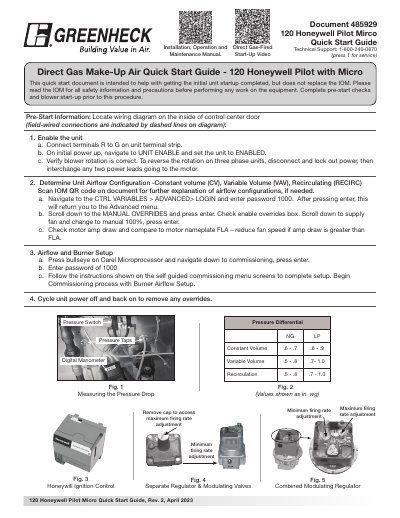

Honeywell Pilot Micro 120 Quick Start Guide - cover page
Brand
Honeywell
Document type
Quick Start Guide
Language
English
Pages
1
File format
PDF
File size
380 KB
Published
27 October, 2026
Updated
27 October, 2026
Model
120
MD5 checksum
FA4076E69FD36D1C86FDDDAC7670675A

About this manual

This document serves as a Quick Start Guide for the Honeywell Pilot Micro 120, providing essential instructions for initial unit startup. It covers pre-start information, including enabling the unit and verifying blower rotation, as well as determining the correct airflow configuration (Constant Volume, Variable Volume, or Recirculating).

What's inside

  • Pre-Start Information
  • Enable the Unit
  • Determine Unit Airflow Configuration
  • Airflow and Burner Setup
  • Cycle unit power off and back on
  • Direct Gas Make-Up Air Quick Start Guide

Frequently asked questions

How do I enable the Honeywell Pilot Micro 120 unit?

Connect terminals R to G on the unit terminal strip, navigate to UNIT ENABLE to set the unit to ENABLED, and verify that blower rotation is correct.

What is the password for the advanced menu?

Enter the password 1000 to access the advanced menu and manual overrides.

How do I measure the pressure drop for the unit?

Measure the pressure drop between the pressure taps using a digital manometer.

Download PDF (380 KB)

More Honeywell Manuals


View all Honeywell manuals →