
Key facts
- Brand
- DELL
- Model
- OptiPlex 5250 All-in-One
- Category
- All-in-One Desktops
- Documents
- 4
- Languages
- ZH · EN
- Last added
- 2026-09-29
Start here
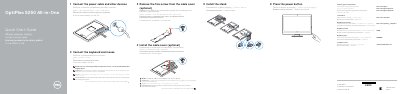
Dell OptiPlex 5250 All-in-One Quick Start Guide
The Dell OptiPlex 5250 All-in-One Quick Start Guide provides step-by-step instructions for setting up the computer, including connecting power, peripherals, and installing the stand.
It includes a detailed map of the device's features, such as available ports, status lights, and optional components like the camera and optical drive, as well as guidance for completing the Windows 10 setup process.
Dell OptiPlex 5250 All-in-One specifications
| Regulatory model | W14B |
|---|---|
| Regulatory type | W14B002 |
| Computer model | OptiPlex 5250 All-in-One |
| Input voltage | 100 V AC-240 V AC |
| Input current (maximum) | 3.0 A |
| Input frequency | 50 Hz-60 Hz |
All Dell OptiPlex 5250 All-in-One documents by type
Day-to-day operation, settings and troubleshooting. Start here if the product is already set up.
The shortest path to a working setup, usually only a few pages.
Questions answered in these manuals
How do I shut down the computer in Windows 10?
Click the Start button, then click the power icon and select “Shut down”.
How do I connect a wireless keyboard or mouse?
Refer to the documentation that shipped with the wireless keyboard or mouse.
Is the cable cover screw required?
No, securing the cable cover using the Torx screw is optional.
Is it necessary to use a Torx screw to secure the cable cover?
No, securing the cable cover with a Torx screw is optional.
What should I do if I connect to a secured wireless network?
You must enter the password for the wireless network access when prompted.
What should I do if I am connecting a wireless keyboard or mouse?
See the documentation that shipped with the wireless keyboard or mouse.