
Key facts
Start here
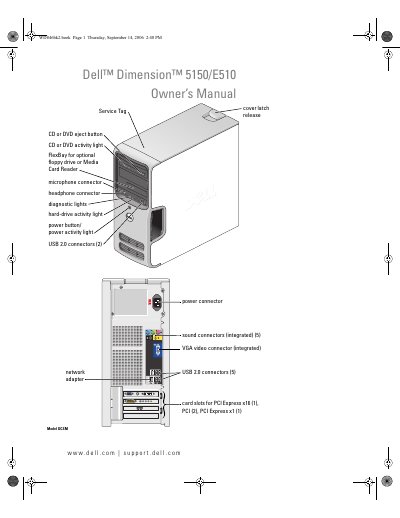
Dell Dimension 5150/E510 Owner's Manual
The Dell Dimension 5150/E510 Owner's Manual is a comprehensive guide designed to help users set up their computer, connect peripherals such as printers and monitors, and configure network settings. It covers essential tasks including playing CDs and DVDs, adjusting system volume and picture settings, and managing power options like Standby and Hibernate modes. This manual is written in Chinese.
Read onlineDELL E510 specifications
| Processor type | Intel Pentium 4 5XXX and 6XXX processors with Hyper-Threading technology |
|---|---|
| Memory Type | 400-MHz and 533-MHz DDR2 unbuffered SDRAM |
| Minimum memory | 256 MB |
| Maximum memory | 4 GB |
All DELL E510 documents by type
Day-to-day operation, settings and troubleshooting. Start here if the product is already set up.
Questions answered in these manuals
What is the minimum memory required for this computer?
The minimum memory required is 256 MB.
Does this computer support Hyper-Threading technology?
Yes, it supports Intel Pentium 4 processors with Hyper-Threading technology, though not all processors support it.
Where can I find the Service Tag on the Dell Dimension 5150/E510?
The Service Tag is printed on the front of the computer near the cover latch.
How do I replace the battery in the Dell Dimension 5150/E510?
Refer to the "Replacing the Battery" section, which provides step‑by‑step instructions for removing the old battery and installing a new one.
What type of USB ports does the Dell Dimension 5150/E510 have?
The computer is equipped with USB 2.0 ports.
How many and what kind of PCI slots are available?
It provides one PCI Express x16 slot, two PCI slots, and one PCI Express x1 slot.