
Key facts
Start here
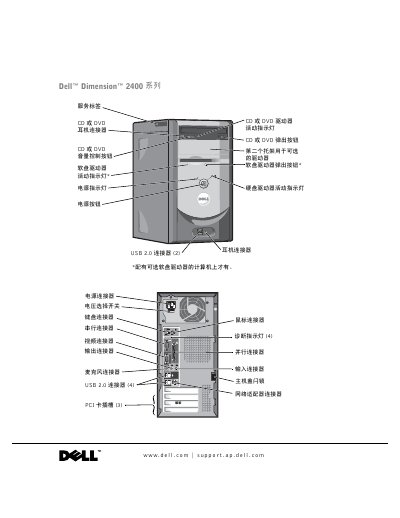
Dell Dimension 2400 User Manual
This manual covers everything needed to set up and use the Dell Dimension 2400 desktop, including safety guidelines, hardware component descriptions, and step‑by‑step installation procedures. It also explains how to connect peripherals such as printers, USB devices, and network adapters.
Additional sections detail troubleshooting methods, diagnostic tools, and specifications of the system, helping both end users and technicians resolve common issues and maintain the computer safely. This manual is written in Chinese.
DELL Dimension 2400 Series specifications
| Microprocessor type | Intel Pentium 4 or Celeron |
|---|---|
| L1 cache | 8 KB |
| L2 cache | 256 KB or 512 KB |
| Chipset | Intel 845GV |
| System clock | 400 MHz or 533 MHz |
| PCI bus speed | 33 MHz |
| PCI connectors | Three 120‑pin connectors |
| BIOS size | 4 Mb (512 KB) |
Source: Dell Dimension 2400 User Manual
All DELL Dimension 2400 Series documents by type
Day-to-day operation, settings and troubleshooting. Start here if the product is already set up.
Questions answered in these manuals
How can I clear a forgotten BIOS password?
Use the password‑clearing procedure described in the manual’s “清除已忘记的密码” section.
How do I add a second CD or DVD drive?
Follow the instructions in the “添加第二个 CD 或 DVD 驱动器” section to install an additional optical drive.
What does the warning symbol indicate?
It indicates possible property loss, personal injury, or death.
How can I copy a CD or DVD?
See the "How to copy CD or DVD" section on page 25 for step‑by‑step instructions.