
Key facts
Start here
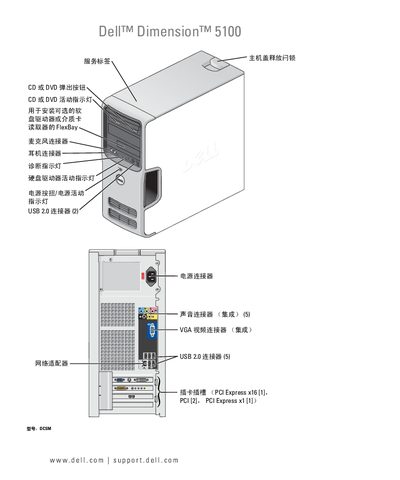
Dell Dimension 5100 User Manual
This manual covers the initial setup of the Dell Dimension 5100, including hardware installation, connecting peripherals such as printers, monitors, and network adapters, and configuring the operating system. Detailed sections explain how to use the CD/DVD drive, floppy drive, and optional media card reader, as well as how to adjust audio, video, and power settings.
Later chapters provide troubleshooting guidance for common issues with drives, audio, video, networking, and system stability. Diagnostic tools, driver management, and system restore procedures are also described to help maintain the computer’s performance. This manual is written in Chinese.
DELL Dimension 5100 specifications
| USB ports | 2 USB 2.0 connectors |
|---|---|
| Memory type | DDR2 |
| Optical drive indicator | DVD activity LED |
Source: Dell Dimension 5100 User Manual
All DELL Dimension 5100 documents by type
Day-to-day operation, settings and troubleshooting. Start here if the product is already set up.
Questions answered in these manuals
How do I change the display settings?
The manual includes a section titled “更改显示设置” that explains how to adjust the display settings.
How can I use the optional media card reader?
See the “使用介质卡读取器 (可选)” section for instructions on using the media card reader.
How can I clear a forgotten password?
The manual provides a procedure for clearing a forgotten password on page 110.
How do I replace the battery?
Battery replacement instructions are given on page 95.