
Key facts
Start here
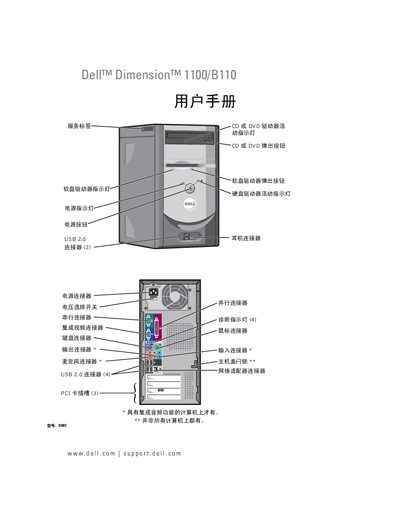
Dell Dimension 1100/B110 User Manual
This manual provides detailed instructions for installing and configuring the Dell Dimension 1100/B110 desktop, including hardware overview, connector locations, and component installation such as hard‑disk, CD/DVD and floppy drives. It also covers system setup utilities, BIOS options, and how to connect peripherals like printers, USB devices, and network adapters.
In addition, the guide offers troubleshooting tips for common issues such as driver problems, audio/video errors, power‑on diagnostics, and system restoration using Windows XP System Restore or Dell PC Restore. Service information, including service tag lookup and support contacts, is provided at the end of the document. This manual is written in Chinese.
All DELL B110 documents by type
Day-to-day operation, settings and troubleshooting. Start here if the product is already set up.
Questions answered in these manuals
How do I connect a USB printer to the Dell Dimension 1100/B110?
Refer to the section titled “连接USB 打印机” for step‑by‑step instructions on attaching a USB printer.
Where can I find the service tag and quick service code on the computer?
The service tag and quick service code are listed under the “服务标签和快速服务代码” section of the manual.