
This document is the user manual for Dell Dimension 5150/E510, which describes the features and characteristics of the product, including the installation of optional floppy disk drives or media card readers in the FlexBay, hard drive activity indicator, microphone connector, headphone connector, etc.
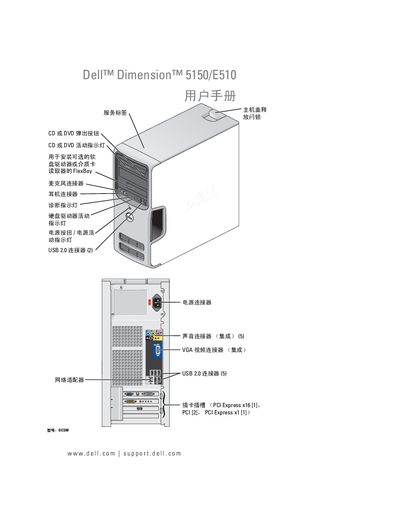
The Dell Dimension 5150/E510 user manual guides users through installing hardware components, connecting peripherals, and configuring the system. It includes detailed procedures for opening the chassis, installing memory, adding expansion cards, and mounting the CD/DVD drive.
Additional sections cover RAID configuration, audio and video output options, power‑saving modes, and diagnostic troubleshooting with indicator‑light explanations. Safety warnings and a full index are also provided. This manual is written in Chinese.
| Memory capacity | 4 GB |
|---|---|
| Memory type | DDR2 |
| USB ports | 2 × USB 2.0 |
| Expansion slots | PCI Express x16, PCI Express x1 |