
This is the user manual of Dell Dimension 5150/E510, which introduces its features and characteristics
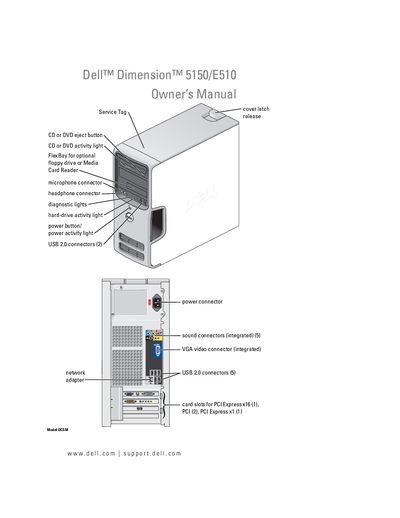
This manual covers everything you need to get started with the Dell Dimension 5150/E510 desktop, including hardware installation, system setup, and basic operation. It explains how to connect peripherals such as monitors, printers, and media card readers, and provides guidance on configuring Windows and network settings.
The guide also includes detailed troubleshooting sections for common issues like power problems, hard‑drive failures, and display errors, as well as step‑by‑step procedures for removing and installing components such as memory modules, drives, and the battery.
The Service Tag is printed on the front of the computer near the cover latch.
Refer to the "Replacing the Battery" section, which provides step‑by‑step instructions for removing the old battery and installing a new one.
Yes. The manual includes a "Connecting Two Monitors" section that explains how to attach two displays using VGA or DVI connectors.
The "Replacing the Computer Cover" section describes how to safely remove the front panel before working inside the system.