
Key facts
Start here
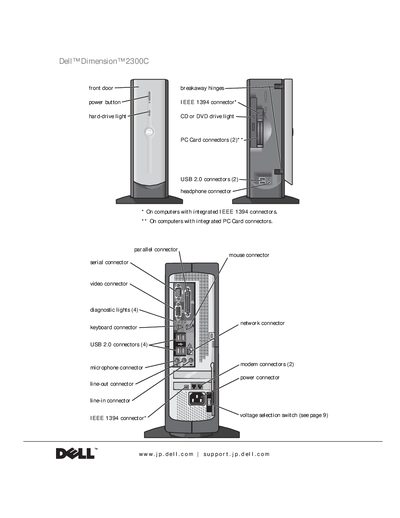
Dell Dimension 2300C User Manual
This manual guides users through setting up the Dell Dimension 2300C, connecting peripherals, configuring networks, and using Windows XP. It includes detailed safety instructions, hardware installation steps, and troubleshooting procedures.
Additional sections cover adding optional cards, using System Restore, and reference specifications. The document is organized with a table of contents, safety cautions, and an index for quick navigation.
All DELL Dimension 2300 documents by type
Day-to-day operation, settings and troubleshooting. Start here if the product is already set up.
Disassembly, diagnostics and part numbers, for repair.
Questions answered in these manuals
What safety precautions should I follow when servicing the computer?
Do not attempt to service the computer yourself unless you are a trained service technician.
How can I restore the system to an earlier state?
Use the System Restore feature; you can create a restore point and revert the computer to that point later.
How many USB 2.0 connectors does the Dimension 2300 have?
The computer has two USB 2.0 connectors on the front and four on the back.
What is the correct way to disconnect a network cable?
First unplug the cable from the network adapter on the back of the computer, then from the network jack.