
Key facts
Start here
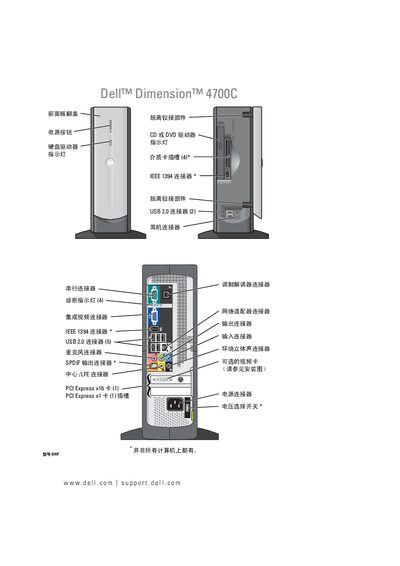
Dell Dimension 4700C User Manual
This manual covers everything needed to set up and operate the Dell Dimension 4700C desktop, including hardware installation, connecting peripherals, power management, and troubleshooting procedures. It also contains safety information and warranty details.
Key sections include installation steps, printer and USB device connections, CD/DVD usage, audio/video guidance, system maintenance, and a full list of technical specifications for the computer. This manual is written in Chinese.
DELL Dimension 4700C specifications
| USB 2.0 ports | 2 |
|---|---|
| IEEE 1394 (FireWire) port | 1 |
| PCI Express x16 slots | 1 |
| PCI Express x1 slots | 1 |
| Maximum memory | 4 GB DDR2 |
| Memory type | DDR2 |
Source: Dell Dimension 4700C User Manual
All DELL Dimension 4700C documents by type
Day-to-day operation, settings and troubleshooting. Start here if the product is already set up.
Questions answered in these manuals
How do I connect a USB printer?
Connect the printer to the USB port as described in the "Connecting USB printer" section.
How do I clear the CMOS settings?
Use the CMOS clear jumper or remove the battery as explained in the "Clear CMOS" instructions.