
Key facts
Start here
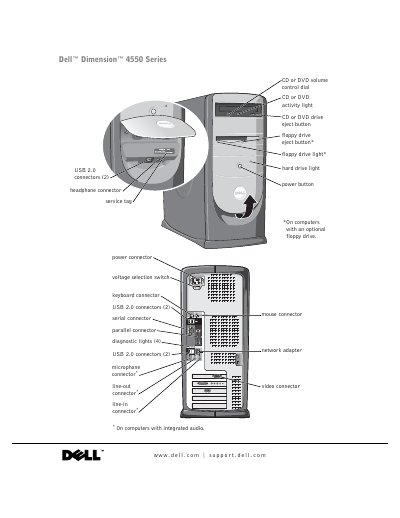
Dell Dimension 4550 Series User Manual
The Dell Dimension 4550 Series User Manual serves as a comprehensive guide for end-users to set up, operate, and maintain their desktop computer. It covers essential topics including connecting peripherals like printers and monitors, configuring network settings, and managing software drivers.
A significant portion of the document is dedicated to troubleshooting common hardware and software issues, such as drive problems, error messages, and system crashes. Additionally, it includes detailed instructions for advanced tasks like adding memory modules or replacing internal components.
Dell Dimension 4550 Series specifications
| Microprocessor type | Intel Pentium 4 |
|---|---|
| L1 cache size | 8 KB |
| System clock data rate | 400- or 533-MHz |
| PCI bus speed | 33 MHz |
All Dell Dimension 4550 Series documents by type
Day-to-day operation, settings and troubleshooting. Start here if the product is already set up.
Questions answered in these manuals
What should I do if a program stops responding?
Refer to the section on solving general problems where specific steps for unresponsive programs are outlined.
How can I clear a forgotten password?
The manual provides instructions in the appendix under 'Clearing Forgotten Passwords'.
How do I reinstall Windows XP on the Dimension 4550?
The manual includes a section titled “Reinstalling Microsoft® Windows® XP” that walks you through the process.
What should I do if the computer shows a blue screen?
The troubleshooting chapter lists “A solid blue screen appears” and provides diagnostic steps to resolve it.