
This document is a quick installation guide for the NETGEAR N150 series wireless router WNR500. The guide includes steps for connecting the router to the network, logging into the router's management interface, and connecting the router to the internet. The router is suitable for both ADSL/Cable Modem connection and broadband line-to-home connection, and supports PPPoE, fixed IP, and dynamic IP broadband types.
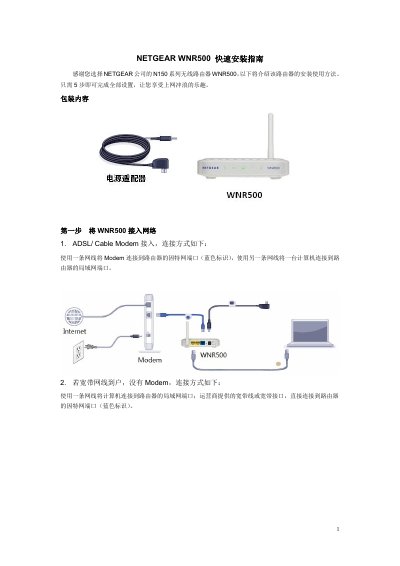
This guide details the five-step installation process for the NETGEAR WNR500 wireless router. It covers unpacking, connecting the device to the network, and logging into the management interface using default credentials. This manual is written in Chinese.
| Wireless Standard | N150 Series |
|---|---|
| Default Username | admin |
| Default Password | password |
| Wireless Password Length | 8~63 characters |
| LAN Ports | 2 x 10/100M Auto |
The default username is 'admin' and the default password is 'password'.
Press and hold the reset button for 5 seconds while the router is powered on.
The wireless password must be between 8 and 63 characters.