
Key facts
- Brand
- JVC
- Model
- DR-MV80B
- Category
- Other Electronics
- Industry
- Electronics
- Documents
- 2
- Languages
- EN
- Last added
- 2026-09-29
Start here
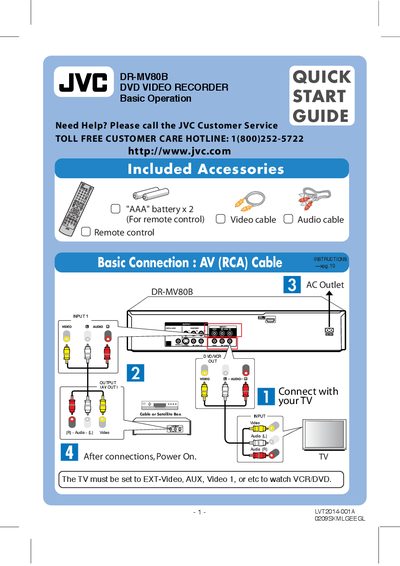
JVC DR-MV80B DVD Video Recorder Quick Start Guide
The guide introduces the JVC DR-MV80B DVD Video Recorder, lists the included accessories, shows how to connect the unit to a TV and power source, and explains basic operation with the remote control.
It then walks through initial setup, basic playback and recording, timer programming (including Timer‑Link with a cable/satellite box), and how to dub VHS tapes to DVD.
JVC DR-MV80B specifications
| Supported Disc Types | DVD‑Video, DVD‑R, DVD+R, DVD‑RW, DVD+RW, DVD‑RAM, CD‑R, CD‑RW, Video CD, Audio CD, DVD+R DL |
|---|---|
| Remote Control Batteries | 2 × AAA |
| Included Cable | AV (RCA) cable |
All JVC DR-MV80B documents by type
The shortest path to a working setup, usually only a few pages.
Day-to-day operation, settings and troubleshooting. Start here if the product is already set up.
Questions answered in these manuals
How do I program a timer recording?
Select "Timer Record", press HOME, then ENTER to set the timer, enter the required information, and finish with RETURN.
How can I dub a VHS tape to DVD?
Insert a blank DVD, press the DUBBING button, select the desired record mode, and start dubbing from the VHS tape.
What video output does the DR-MV80B provide?
It provides an HDMI digital output with 1080p/720p up‑conversion for both DVD and VHS playback.
How many hours can be recorded on a DVD in SP mode?
Approximately 2 hours of video can be recorded on a DVD in SP mode.