
Quick start guide for the JVC DR-MV80B DVD Video Recorder covering connections, setup, playback, recording, timer and dubbing.
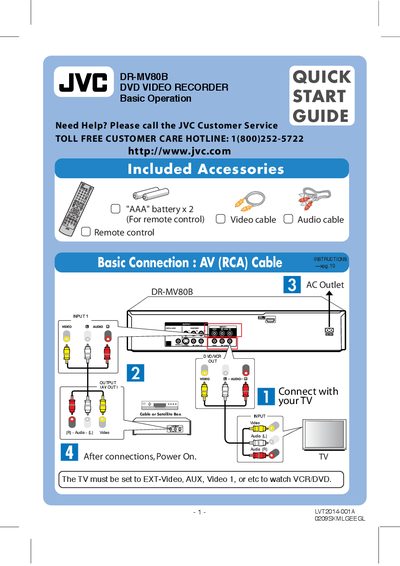
The guide introduces the JVC DR-MV80B DVD Video Recorder, lists the included accessories, shows how to connect the unit to a TV and power source, and explains basic operation with the remote control.
It then walks through initial setup, basic playback and recording, timer programming (including Timer‑Link with a cable/satellite box), and how to dub VHS tapes to DVD.
| Supported Disc Types | DVD‑Video, DVD‑R, DVD+R, DVD‑RW, DVD+RW, DVD‑RAM, CD‑R, CD‑RW, Video CD, Audio CD, DVD+R DL |
|---|---|
| Remote Control Batteries | 2 × AAA |
| Included Cable | AV (RCA) cable |
Select "Timer Record", press HOME, then ENTER to set the timer, enter the required information, and finish with RETURN.
Insert a blank DVD, press the DUBBING button, select the desired record mode, and start dubbing from the VHS tape.
Timer‑Link works with the timer function of most cable/satellite boxes, must use the Input 1 connector, and the box must not have a screen‑saver active.