
Key facts
- Brand
- JVC
- Model
- BR-EN900
- Category
- Other Electronics
- Industry
- Electronics
- Documents
- 2
- Languages
- EN
- Last added
- 2026-10-03
Start here
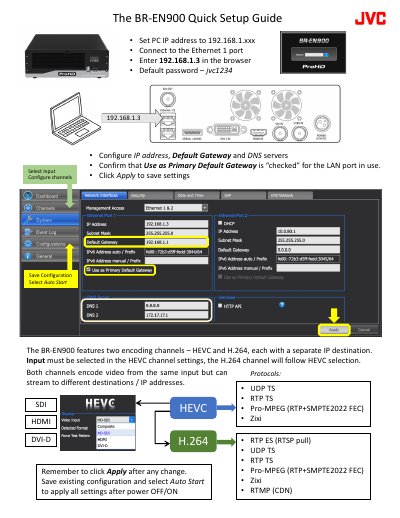
JVC BR-EN900 Encoder Quick Setup Guide
The guide walks you through the initial configuration of the BR-EN900 encoder. It shows how to set a PC IP address, connect to Ethernet port 1, access the web interface at 192.168.1.3, and configure the IP address, default gateway, DNS servers, and primary gateway settings. After making changes, click Apply and optionally enable Auto Start for power‑on operation.
It also explains the encoder’s two independent channels (HEVC and H.264), the supported input types (SDI, HDMI, DVI‑D) and streaming protocols (UDP TS, RTP TS, Pro‑MPEG, Zixi, RTMP, etc.). Details on latency, error‑correction settings, and UDP packet‑size considerations for reliable WAN streaming are included.
JVC BR-EN900 specifications
| Encoding channels | Two (HEVC and H.264) |
|---|---|
| Separate IP destination per channel | Yes |
| Supported input interfaces | SDI, HDMI, DVI‑D |
| Auto‑Start | Enabled via configuration |
All JVC BR-EN900 documents by type
The shortest path to a working setup, usually only a few pages.
Day-to-day operation, settings and troubleshooting. Start here if the product is already set up.
Questions answered in these manuals
How can I make the encoder start encoding automatically after power‑on?
Save the current configuration and enable the Auto Start option; the encoder will begin encoding when power is applied.
How can I reset the BR‑EN900 to its factory settings?
The reset procedure is described in Chapter 5 ‘ProHD BR‑EN900 Reset’.
From: JVC BR-EN900 HEVC Encoding and Streaming Appliance User Manual
What do the Power LED colors indicate on the front panel?
Off means the appliance is off; solid green means it is ready; blinking green once per second indicates the unit is starting; blinking green twice per second shows a firmware upgrade in progress.
From: JVC BR-EN900 HEVC Encoding and Streaming Appliance User Manual