
Key facts
Start here
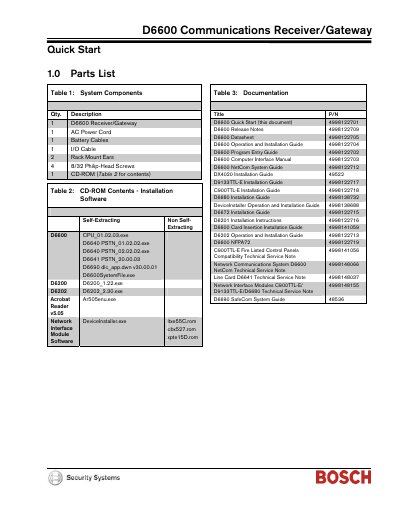
Bosch D6600 Communications Receiver/Gateway Quick Start Guide
The Bosch D6600 Communications Receiver/Gateway quick start guide provides step-by-step instructions for initial hardware installation. It covers unpacking, rack or desktop mounting, inserting CPU and line cards, connecting AC power (100-120/220-240 VAC, 50-60 Hz, 2.5 A), telephone lines, an automation computer via COM3 (DB-9) using a null-modem cable, and an optional parallel printer.
The guide also explains how to set the time and date through the front-panel menu, and provides an overview for connecting the optional D6680 Network Adapter to COM4 for NetCom network integration, including Ethernet cabling to a network hub and Telnet configuration. A brief D6200 software installation overview is included.
Bosch D6600 specifications
| Transmission Protocol | UDP/IP packets |
|---|---|
| Encryption | 128-bit Rijndael Encryption |
| PSTN Lines Support | up to 32 lines |
| NetCom Accounts Capacity | up to 3,200 accounts |
| Network Connectivity | 10/100 network connectivity |
All Bosch D6600 documents by type
Day-to-day operation, settings and troubleshooting. Start here if the product is already set up.
The shortest path to a working setup, usually only a few pages.
Questions answered in these manuals
What is the AC power input rating for the D6600?
The D6600 accepts 100-120/220-240 VAC at 50-60 Hz, drawing 2.5 A.
From: Bosch D6600 Communications Receiver/Gateway Quick Start Guide
How do you connect an automation computer to the D6600?
Connect the automation computer to COM3, the center DB-9 connector on the CPU terminator card, using a null-modem cable.
From: Bosch D6600 Communications Receiver/Gateway Quick Start Guide
What is the NetCom system?
NetCom is an award-winning combination of hardware and software that provides a solution for transmitting Alarm Events over the Internet or a private intranet using UDP/IP packets.
Is NetCom compatible with existing control panels?
Yes, it is compatible with almost all manufacturers' control panels, allowing for simple integration into an existing system.
What replaces Lxx in networked accounts?
Nxx appears instead of Lxx in the line number.
From: Bosch D6600 Computer Interface Manual Appendix D: NetCom Messages
What does condition code 007 indicate?
Condition 007 indicates Alarm-Panel Substitution or Replay.
From: Bosch D6600 Computer Interface Manual Appendix D: NetCom Messages