
Key facts
- Brand
- Olympus
- Model
- C-60
- Category
- Digital cameras
- Industry
- Electronics
- Documents
- 4
- Languages
- EN · ZH
- Last added
- 2012-06-08
Start here
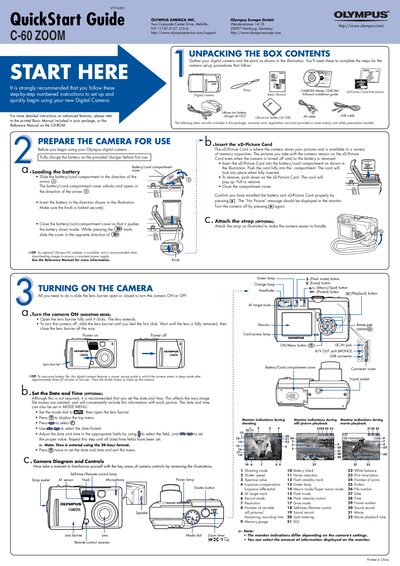
Olympus C-60 Zoom Digital Camera Quick Start Guide
This guide walks you through the first steps of using the Olympus C-60 Zoom digital camera, from unpacking the box and charging the battery to inserting the xD‑Picture Card and attaching the optional strap. It also explains how to turn the camera on, set the date and time, and understand the basic controls and monitor indications.
The document then covers essential functions such as taking pictures with the viewfinder or monitor, zooming, using flash modes, viewing and erasing images, and connecting the camera to a computer for image transfer and software installation.
Olympus C-60 specifications
| Effective Pixels | 6,070,000 |
|---|---|
| Image Sensor | 1/1.76 inch CCD |
| Maximum Image Resolution | 2816 × 2112 pixels |
| Lens Focal Length | 7.8 – 23.4 mm |
| Maximum Aperture | f/2.8 – f/4.8 |
| Memory Card Type | xD‑Picture Card 16 MB – 512 MB |
| Battery | Olympus LI‑10B/12B Li‑ion |
| LCD Screen | 1.8‑inch TFT, ~134,000 dots |
| Dimensions (W×H×D) | 99.1 mm × 56.4 mm × 41.0 mm |
| Weight (without battery/card) | 198 g |
All Olympus C-60 documents by type
Day-to-day operation, settings and troubleshooting. Start here if the product is already set up.
The shortest path to a working setup, usually only a few pages.
Questions answered in these manuals
How do I charge the battery before first use?
Fully charge the battery on the provided charger before first use.
How do I insert the xD‑Picture Card?
Insert the xD‑Picture Card into the battery/card compartment, push it fully in until it locks, then close the compartment cover.
What is the model number of this camera?
The model number for this digital camera is C-60 ZOOM.
How can I connect the camera to a computer?
You can download images by connecting the camera directly to your computer using the provided USB cable if you have a compatible OS.
How do I replace the remote control battery?
Replace the remote’s battery with a CR2025 cell.
What type of memory card does the C‑60 ZOOM use?
It uses an xD‑Picture Card ranging from 16 MB to 512 MB.