
Key facts
- Brand
- Nikon
- Model
- D80
- Category
- Digital cameras
- Industry
- Electronics
- Documents
- 8
- Languages
- ZH · EN
- Last added
- 2012-07-02
Start here
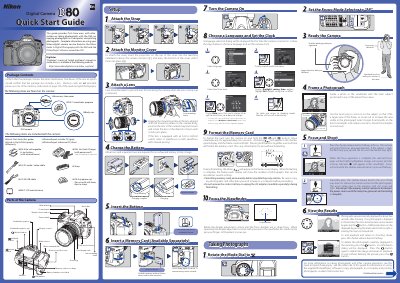
Nikon D80 Digital Camera Quick Start Guide
This document serves as a Quick Start Guide for the Nikon D80 digital camera. It lists the items included in the package, such as the EN-EL3e battery, USB cable, and PictureProject software CDs. The guide also identifies key parts of the camera body, including the mode dial, viewfinder eyepiece cup, and accessory shoe cover. This manual is written in Chinese.
Read onlineNikon D80 specifications
| Port types | Flat, wide‑angle, fisheye |
|---|---|
| Flash arm lengths | 11 cm, 23 cm, 31 cm, 50 cm |
| Viewfinder option | 45° viewfinder rotating 360° |
All Nikon D80 documents by type
Day-to-day operation, settings and troubleshooting. Start here if the product is already set up.
The shortest path to a working setup, usually only a few pages.
Disassembly, diagnostics and part numbers, for repair.
Questions answered in these manuals
How long does it take to fully charge an exhausted battery?
About two and a quarter hours are required for an exhausted battery to fully charge.
How do I format the memory card?
Turn the camera on and hold the ( and ) buttons down simultaneously for approximately two seconds.
How do I open and close the Hugyfot housing for the Nikon D80?
The housing is opened and closed with two built‑in countersunk bolts using the supplied socket screw key; only the correct key can operate them.
How do I use the menus?
See pages 9–10 for instructions on navigating the camera menus.
How do I attach a lens?
Refer to page 11 for steps on attaching a lens to the D80.
What does the focal plane indicator represent?
It indicates the point at which the image is focused—the sensor plane for the D80.