
This document is a quick reference sheet for the Nikon D80 camera. The sheet provides information on the front, top, and back views of the camera, as well as explanations of the various buttons and functions.
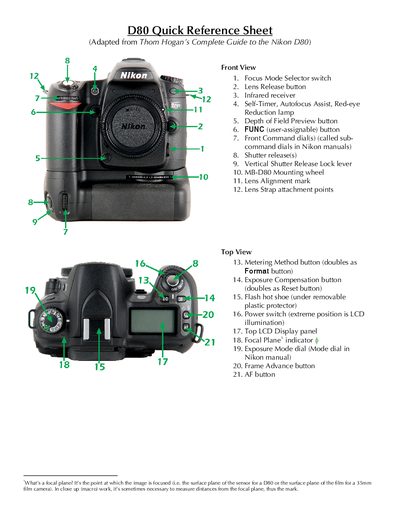
This quick reference sheet provides a visual guide to the Nikon D80’s front, top, back and side controls, labeling each button, dial and connector with brief descriptions. It is adapted from Thom Hogan’s Complete Guide to the Nikon D80 and is intended for owners of the camera.
The sheet also lists the camera’s indicator legends—such as image size, quality, ISO, battery status and focus mode—so users can quickly interpret the LCD read‑outs. Copyright information and version details are included at the end.
| Image Size options | L (medium), S (small) |
|---|---|
| Image Quality options | RAW, FINE, NORM, BASIC |
| Auto ISO indicator | Iso‑AUTO |
| Battery Condition indicator | Shows battery status |
It indicates the point at which the image is focused—the sensor plane for the D80.
The Secure Digital Card Access Door slides toward the back of the camera and then springs open.
The Battery Condition indicator on the LCD displays the current battery status.