
Key facts
- Brand
- Nikon
- Model
- D100
- Category
- Digital cameras
- Industry
- Electronics
- Documents
- 5
- Languages
- ES · EN
- Last added
- 2012-07-02
Start here
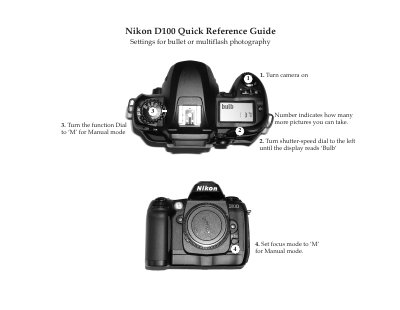
Nikon D100 Quick Reference Guide
The Quick Reference Guide provides step‑by‑step instructions for turning the camera on, selecting shooting modes (Manual, Shutter‑Priority, Aperture‑Priority, point‑and‑shoot), and adjusting focus and exposure settings. It also shows how to reset the camera to its default configuration and explains the location of the battery pack, charger, and memory card slot.
Additional sections describe how to connect the D100 to a laptop via the USB port, use the Nikon Capture Control and Viewer software, and operate the camera on a tripod with an AC adapter. The guide is designed for fast setup and basic operation without detailed technical explanations.
Nikon D100 specifications
| Supported Windows operating systems | Windows XP Home/Professional, Windows 2000 Professional, Windows Me, Windows 98 SE |
|---|---|
| CPU requirement | 300 MHz Pentium or better |
| RAM requirement (Windows) | 128 MB (256 MB recommended) for XP; 64 MB (128 MB with RAW) for other versions |
| Hard‑disk space required | 200 MB plus additional free space equal to double the camera memory card capacity |
| Video resolution requirement | 800 × 600 pixels or higher, 16‑bit color (24‑bit recommended) |
| Supported cameras | D1, D1X, D1H, D100, and USB‑equipped COOLPIX series |
All Nikon D100 documents by type
Day-to-day operation, settings and troubleshooting. Start here if the product is already set up.
The shortest path to a working setup, usually only a few pages.
Mounting, wiring and first power-up. Read it before the hardware goes in.
Questions answered in these manuals
What is the maximum safe distance between the flash and the subject when photographing children?
You must avoid having the flash less than one meter away from the subject.
What should you do if you notice smoke or an unusual smell coming from the camera?
Disconnect the AC adapter and remove the battery immediately with care to avoid burns.
How many shots can the D100 take on a single battery charge?
The battery is rated for approximately 1,600 captures on one charge.
What type of memory cards does the D100 support?
It uses CompactFlash Type I/II cards and can also accept IBM MicroDrive cards.
How do I set the Nikon D100 to the Medium image size?
Rotate the Function Dial to the QUAL mode and then turn the Sub‑Command Dial until the “M” (Medium) setting appears on the LCD.
What aperture should I use for extraoral dental photographs?
Set the aperture to F11 using the Sub‑Command Dial.